Files processed in your browser · Original dimensions & colors preserved
Clean & Repurpose Your Media Easily
removegemini-watermark.com is an online free tool which helps remove visible Gemini-related watermarks, logos, or branding elements. It reconstructs the area hidden by a visible watermark so that you can continue editing, reviewing, or repurposing media.
Whether you’re working with marketing concepts, presentation assets, social media content, video drafts, or any AI-generated artwork, the goal is simple: identify the visible mark, restore the covered area, and get the cleaner version of the file for further use.
Interactive Preview
Preview Your Clean Result
Drag the slider below to inspect how the covered area is reconstructed with pixel accuracy.
Cleaned ResultOriginal (With Watermark)
Step-by-Step
How It Works
Remove Gemini or Veo watermarks in just a few simple steps.
Step 01 · Upload
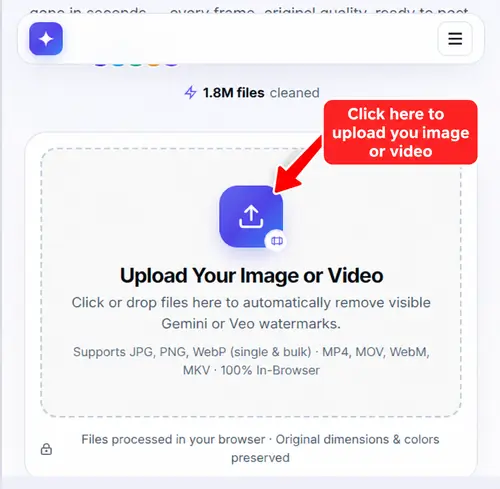
Upload Your Image or Video
Upload the file you want to clean. You can add Gemini-generated images, Veo videos, or AI-generated visuals with visible watermarks.
Step 02 · Detect & Clean
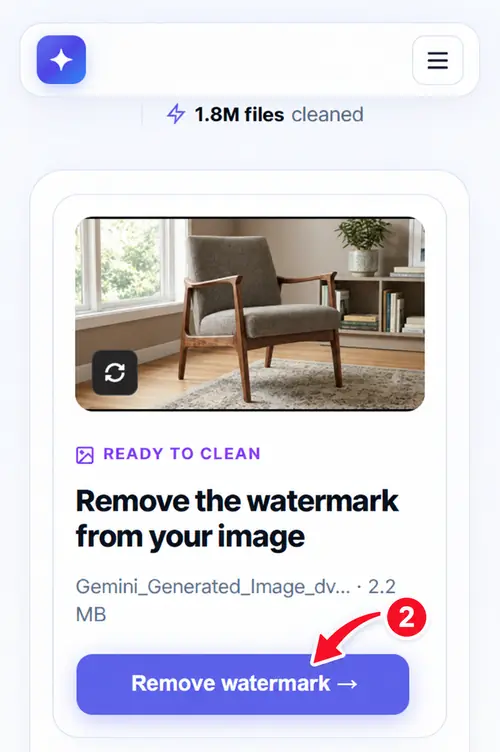
Click Remove Watermark
Our tool automatically detects the visible Gemini or Veo watermark and starts cleaning the affected area while keeping quality intact.
Step 03 · Preview
Preview Your Clean Result
Inspect the reconstructed pixels, text clarity, and textures with the instant comparison view to ensure seamless restoration.
Step 04 · Download
Download Your Clean File
Click Download or Copy to save your cleaned full-resolution file directly to your device with zero watermark trace.
Step 6 (Optional): Remove C2PA & SynthID
If your workflow requires additional metadata or provenance handling, a separate step is available. Visible watermark removal and AI provenance information are different processes.
Restoration approaches for images and video are different. Here is how our engine handles each medium.
🖼️
For Images
A still image contains a single frame, allowing the software to focus on one watermark location with sub-pixel precision.
Identifying the watermark region
Analyzing nearby pixels
Estimating hidden textures and details
Reconstructing the covered area
Preserving visual continuity
🎬
For Videos
Video restoration demands frame-to-frame consistency across the entire timeline to eliminate flicker and visual drift.
Detecting the watermark across multiple frames
Tracking movement through the timeline
Reconstructing hidden content repeatedly
Maintaining consistency between frames
Exporting final rendered video losslessly
Understanding Gemini Watermarks
Watermark appearance can vary based on product updates, generation workflow, and export settings.
01 · Visible Watermarks
Visible Watermarks
Elements users can see directly on an image or video. They may appear as logos, branding marks, text overlays, or corner identifiers.
02 · File Metadata
Metadata
Information associated with a file. Metadata contains creation details, timestamps, or EXIF tags, which is different from a visible mark.
03 · Provenance
Invisible Provenance Signals
Technologies such as Google DeepMind SynthID embedded into pixel frequency domains that are handled through our dedicated tool.
Why People Remove Gemini Watermarks
Users often want cleaner assets for legitimate editing and professional production purposes.
💼
Client Presentations
Designers and creative teams need cleaner mockups for internal review or approved presentation materials.
📊
Marketing Concepts
Teams frequently test layouts, advertising ideas, and visual concepts before publishing final campaign assets.
🎬
Content Production
Creators incorporate authorized media into broader editing workflows where branding elements are no longer required.
📋
Internal Documentation
Companies use visuals in training materials, reports, and presentations where unnecessary overlays distract.
🎨
Portfolio Preparation
Professionals refine approved project assets before including them in case studies and portfolio collections.
👥
Agencies & Freelancers
Authorized media preparation and brand polishing is a standard part of professional creative workflows.
Technology
How Watermark Removal Technology Works
A Gemini AI watermark remover does not simply erase pixels. The challenge is recreating the content that existed underneath the visible mark.
1. Detecting the Watermark
The first step is identifying the affected area. Software looks for repeated patterns, logos, text overlays, contrasting graphic elements, and consistent placement regions. Accurate detection improves reconstruction quality.
2. Reconstructing Hidden Content
Once the watermark region is identified, the surrounding image provides clues. The system analyzes nearby textures, colors, shapes, lighting, and contextual visual information to create a natural-looking replacement.
3. Tracking Watermarks in Video
Tracking watermarks across video timelines ensures restoration remains consistent throughout the entire clip sequence even when background scenes move dynamically.
4. Preserving Frame Consistency
Eliminates flickering, ghosting, and visual instability between adjacent video frames, maintaining professional production quality.
Gemini, Google Flow, Veo, Imagen, and Nano Banana
Compatible with popular AI-generated media products.
Gemini
Google's AI platform for image and content-generation workflows.
Google Flow & Veo
AI-assisted filmmaking and video-generation technology.
Transparent expectations help users achieve the best possible outcomes.
✓ WHAT IT CAN DO
✓ Help remove visible Gemini-related watermarks
✓ Assist with image cleanup workflows
✓ Support restoration of covered visual areas
✓ Improve presentation readiness of authorized media
✓ Help users process image and video content in browser
ℹ WHAT IT CANNOT GUARANTEE
• Perfect restoration on every complex file
• Identical results across all intricate backgrounds
• Automatic removal of invisible provenance signals (use SynthID tool)
• Legal authorization to modify third-party copyrighted content
File Compatibility
Supported Image and Video Formats
Process files from Gemini, Veo, Google Flow, and Imagen without pre-conversion.
🖼️
PNG (.png)
Lossless original Gemini export. Limit: 10 MB.
📷
JPG / JPEG
Standard format for shared images. Limit: 10 MB.
🌐
WebP (.webp)
Modern high-efficiency format. Limit: 10 MB.
🎬
MP4 / MOV / WebM / MKV
Standard Veo video formats. Limit: 200 MB.
FAQ
Frequently Asked Questions
Everything you need to know about removing Gemini watermarks.
A Gemini watermark remover is a tool that attempts to remove visible Gemini-related logos, branding marks, or overlays from images and videos while reconstructing the area hidden underneath.
Removing a Gemini watermark is simple. Upload your image or video, start the watermark removal process, and wait while the tool cleans the visible Gemini or Veo watermark. Once processing is complete, preview the result, check the restored areas, and download the cleaned file. If available, you can also continue with additional options such as C2PA or SynthID handling after the watermark has been removed.
Absolutely. Upload your image, click Remove Watermark, and the tool will process the visible Gemini watermark for you. After processing, you'll be able to preview the cleaned image and download the result in just a few steps.
Yes. Upload your Gemini or Veo video, start the removal process, and let the tool handle the watermark automatically. Once processing is complete, you can preview the cleaned video and download it directly from your browser without needing advanced video-editing software.
Yes. Image watermark removal is completely free, with no daily limits and no account registration required. Video watermark removal is also available for free with a daily usage allowance.
Yes. removegemini-watermark.com supports compatible images and videos from Gemini, Veo, Imagen, Google Flow, and Nano Banana workflows.
There is no general rule that Gemini automatically removes visible watermarks from previously generated files. Editing workflows depend on the tools being used.
No. Gemini Advanced does not include a feature for removing visible watermarks from generated images or videos. If a watermark appears in your exported media, you'll need to use a separate watermark-removal solution.
No. The tool is designed to remove visible Gemini and Veo watermarks while maintaining the original quality of your image or video whenever possible.
Yes. Upload the image or video containing the watermark, start the removal process, review the result, and download the cleaned file.
There's no need for a Chrome extension. The tool works online in your browser, allowing you to remove Gemini and Veo watermarks without installing anything.
No. removegemini-watermark.com is designed to remove visible Gemini and Veo watermarks only. SynthID removal is a separate process and requires a dedicated tool. If you need both, first remove the visible watermark and then use our separate SynthID Removal Tool.
Generally, yes—if you're removing the watermark from content that you created, own, or have permission to modify. However, legality can depend on factors such as copyright ownership, licensing terms, contractual obligations, platform policies, and local laws. You should not remove watermarks from content that belongs to others without proper authorization.
The Gemini watermark is typically a small four-point sparkle logo displayed in a corner of the image or video frame.
Clean Up Your Media with Confidence
Designed to help users remove visible Gemini-related branding from authorized images and videos while preserving visual quality.