SynthID Remover – Remove Invisible AI Watermarks From Images
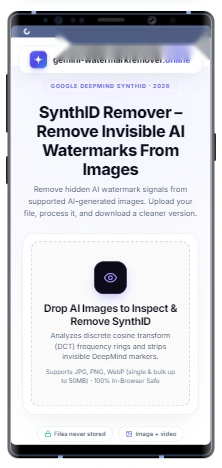
Remove hidden AI watermark signals from supported AI-generated images. Upload your file, process it, and download a cleaner version.
Drop AI Images to Inspect & Remove SynthID
Analyzes discrete cosine transform (DCT) frequency rings and strips invisible DeepMind markers.
Supports JPG, PNG, WebP (single & bulk up to 50MB) · 100% In-Browser Safe
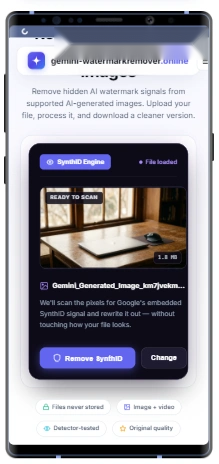
SynthID Engine
File loaded
READY TO SCAN922 KB
synthid-target-image.webp
We'll scan the pixels for Google's embedded SynthID signal and rewrite it out — without touching how your file looks.
SYNTHID BATCH (3 files)
Ready to scan & remove SynthID in bulk
Scrubbing SynthID 1 of 3...33%
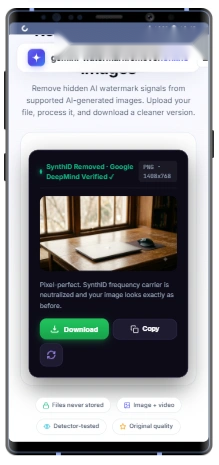
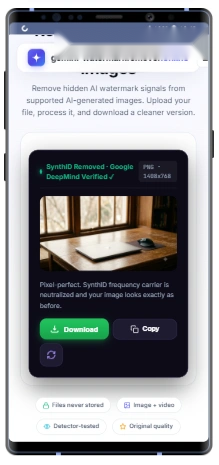
SynthID Removed · Google DeepMind Verified ✓
PNG
Pixel-perfect. SynthID frequency carrier is neutralized and your image looks exactly as before.
Files never stored
Image + video
Detector-tested
Original quality
DeepMind Technology
What Is SynthID
SynthID is basically a Google DeepMind tool that adds an invisible digital watermark to AI-generated content. It adds a secret code to tag and identify AI content by artificial intelligence.
Because the SynthID watermark is embedded beneath the surface of images, video, audio, and text, it can’t be removed by cropping, compressing, resizing, or converting formats.
Even standard image editors can’t identify this code. The content looks perfectly normal, but a SynthID detector or checker can easily pick up this hidden signal.
SynthID doesn’t compromise the look, sound, or meaning of the original content. Google uses it in tools like Gemini and Imagen. OpenAI images also contain this code.
Our SynthID remover identifies the hidden frequency patterns directly. It removes the SynthID by applying controlled pixel-level adjustments without changing the image quality. The final result comes without SynthID, which is ready to use in the workflow.
How It Works
Remove Invisible AI Watermarks in Simple Steps
A straightforward workflow designed for creators and professionals.
Step 01 · Upload
Step 1: Upload Your AI-Generated Image
Start by uploading your AI-generated image. Drag and drop your file into the upload area or select it from your device. Supports PNG, JPG, and WebP formats.
Step 02 · Detect & Clean
Step 2: Click “Remove SynthID”
After uploading, our system analyzes pixel frequencies for embedded SynthID signals. Click “Remove SynthID” to initiate the cleaning sequence.
Step 03 · Rebuild
Step 3: Process & Clean Image
The tool neutralizes the detected SynthID frequency carrier and rebuilds the affected pixels while preserving 100% of your visual image quality.
Step 04 · Download
Step 4: Download Clean Image
Once processing is completed, tap the “Download” or “Copy” button to save your clean image and continue using it seamlessly in your workflow.
Key Benefits
Why Use a SynthID Remover?
SynthID remover can identify and eliminate Google’s invisible, pixel- or token-level AI watermarks from generated images, text, or audio.
🔒 Privacy
Prevents content from disclosing that it’s generated with the help of AI.
🎨 Creative Control
Gives creators and artists full independence from automatic AI labeling on work, although they’ve utilized generative tools.
🌐 Platform Compatibility
Stop the third party filters from identifying watermarks which avoids restricting, flagging, or down-ranking watermarked content.
🔬 Research and Testing
Provides watermark-free content to researchers who need samples without AI-labeled content in their workflow.
Compatibility
Supported AI Images and Platforms
Various models are available on the internet to generate AI images. Our SynthID remover is designed for supported AI-generated images where there is a possibility of an invisible watermark.
Gemini Generated Images
AI-generated images through Gemini may include invisible provenance signals using SynthID technology which is not visible to the human eye. If you’re using Gemini, you can upload your image, analyze the file, and download the images free from SynthID.
Imagen AI Images
Imagen is also a Google AI image generation tool designed to create realistic and creative visuals from text prompts. These images also contain SynthID. Our SynthID remover can also remove this invisible watermark while maintaining visual quality.
Other AI Visual Content
Now AI images can be created through many different models and platforms. Some may use their own watermarking, metadata, or provenance technologies. Our tool can also be used to neutralize invisible watermarks across supported AI pipelines.
File Compatibility
Supported Image Formats
Our SynthID remover supports commonly used image formats, making it easy to upload and process AI-generated images without unnecessary file conversions.
PNG (.png)
PNG is a popular format for AI-generated images because it preserves high-quality details and supports lossless image data.
JPG / JPEG (.jpg, .jpeg)
JPG and JPEG are commonly used image formats for everyday sharing and online publishing.
WebP (.webp)
WebP is a modern image format that provides good visual quality with smaller file sizes.
BATCH WORKFLOW
Process Multiple AI Images Together
Removing SynthID from many images one by one can be time-consuming. Our tool can also handle bulk SynthID removal so users can process multiple supported images together.
This feature is useful for creators, designers, and teams working with large collections of AI-generated images who need a faster workflow. Further, each uploaded image is processed individually to help preserve its original appearance and visual details.
Best Practices
Tips for Better SynthID Removal Results
SynthID and other AI watermarking technologies are constantly evolving. Follow these guidelines to ensure the highest output fidelity.
1. Upload High-Quality Images
Image quality and condition play a major role in processing results. Higher-quality images usually comprise more visual information, which helps maintain details during processing.
Use clear, high-resolution images
Avoid extremely compressed files
Keep important details visible
2. Use the Original AI-Generated Image
Whenever possible, upload the original images created by your AI tool. Original images usually contain more image information compared to screenshots or repeatedly exported versions.
Upload the first-generation file
Avoid screenshots of AI images
Keep the highest-quality version available
3. Avoid Multiple Re-Exports
Every time an image is edited, resized, or compressed, some visual information may be compromised.
Avoid unnecessary format conversions
Do not repeatedly save and export the same image
Use the original download whenever possible
4. Check Your Image & Keep a Backup
After uploading, preview the image to ensure it's clear, not corrupted, in a supported format, and within the 50MB upload limit. Always keep a backup of your original file.
Compare before and after results
Reprocess the image later if needed
Maintain your complete creative archive
Transparency
What This Tool Does and Doesn't Do
Results Vary by File
Every image has different characteristics; results may vary depending on the AI model, embedded signals, and file conditions. SynthID is designed to remain detectable even after common transformations.
File Size & Processing Time
Higher-resolution images contain more visual information, which takes extra time to process. If possible, keep file size up to 50 MB for the fastest in-browser turnaround.
Modern Browser Optimized
For smooth processing, use updated browsers like Google Chrome, Microsoft Edge, Safari, or Firefox for optimal WebAssembly and canvas rendering.
Security First
Privacy and File Security
We developed our SynthID remover keeping in mind the privacy and security of users. Whether you’re processing your personal AI artwork, client assets, or professional creative files, your content is your property.
Your Files Stay Private
We don’t use data for AI model training, advertising, or sharing with third parties.
No Unnecessary Storage
Files are processed client-side in your browser and are never stored on external servers.
Secure Processing
A protected workflow maintaining visual fidelity while responsibly neutralizing metadata.
User Profiles
Who Uses SynthID Remover?
🎨 Content Creators
Manage AI-generated visuals for social media, publishing, and creative projects.
🏢 Designers & Agencies
Prepare AI-assisted concepts, mockups, and client-ready assets.
📈 Marketing Teams
Organize AI visuals for campaigns, presentations, and brand content.
🔬 Researchers
Study AI watermarking, provenance, and content verification systems.
✍️ Text & Media Refiners
Manage and prepare AI-assisted content for different creative workflows.
🚀 Independent Artists
Retain full creative control over portfolio artwork and digital exports.
Answers & Details
Frequently Asked Questions About SynthID Remover
Find answers to commonly asked questions about Google DeepMind SynthID, invisible watermarks, and removal workflows.
SynthID is an invisible watermarking technology developed by Google DeepMind to help identify AI-generated content. Unlike visible logos or text marks, SynthID signals are embedded into AI-generated content and are designed to remain detectable through supported verification methods.
Yes, Google uses SynthID technology across supported AI-generated content workflows. Depending on the product, model, and generation method, some AI-generated images may contain invisible SynthID watermark signals.
No. SynthID is different from a traditional watermark logo. A visible watermark can appear as a logo, text overlay, or branding mark. SynthID is an invisible signal embedded within AI-generated content and cannot be seen directly by looking at the image.
SynthID processing depends on the image, AI model, and watermark implementation. Our tool is designed to process supported SynthID signals from compatible AI-generated images. However, results may vary depending on the source file and technical factors.
The goal of SynthID processing is to maintain the original visual appearance of your image. However, results can depend on factors such as image resolution, file quality, previous edits, and image complexity. For the best results, always upload the highest-quality original file available.
SynthID is primarily associated with Google's AI-generated content workflows, including supported systems such as Imagen, Gemini, Veo, and other Google AI products. Support can vary depending on the model, platform version, and generation method.
No. SynthID and visible watermark logos are different technologies. A watermark logo is a visible graphic element placed on an image, while SynthID is an invisible digital signal designed to help identify AI-generated content.
The tool is designed to process compatible AI-generated images where supported SynthID signals may be present. Upload your Gemini-generated image to check whether it can be processed through the workflow.
Yes, privacy is an important part of the processing workflow. Uploaded images are handled client-side in your browser for the requested processing purpose and are never used for unrelated activities or stored on external servers.
Yes. The tool supports bulk image processing, allowing users to upload and manage multiple compatible AI-generated images in one workflow. Bulk processing is useful for creators, designers, and teams working with larger AI image collections.
No. SynthID is a watermarking and provenance technology designed to help identify AI-generated content. It does not determine ownership, copyright, or usage rights for an image. Ownership depends on factors such as the platform terms, licensing agreements, and how the content was created and used.
SynthID and C2PA are different approaches to AI content identification:
SynthID: Invisible watermark signal embedded into pixel data, designed for AI content verification. C2PA: Content credential standard that stores cryptographic metadata about how digital content was created or modified.
Removing one does not automatically remove the other.
SynthID is designed to be resilient against certain image transformations like resizing or compression. However, how it behaves after editing depends on the specific implementation and processing method.
Our tool supports commonly used image formats, including PNG, JPG, JPEG, and WebP. For the best results, upload the highest-quality original image available.
The result depends on the image, watermark implementation, and future verification technologies. After processing, the output file becomes a separate version of your image. Always keep your original file as a backup.
Yes, the tool can be used with supported AI-generated images, including creative artwork, illustrations, and generated visuals. Always make sure you have permission to modify the content you process.
No. SynthID is only one method used to identify AI-generated content. AI detection systems may use different signals including watermarks, metadata, image analysis, and external detection models.
Processing time depends on factors such as image size, resolution, file complexity, and current device capabilities. Most standard images can be processed in just a few seconds directly in your browser.
No. The tool works directly in your browser without requiring additional software installation or plugins. You can upload your image, process it, and download the result from your device.
No. A Gemini logo or sparkle mark is a visible watermark that appears in the corner of an image. SynthID is an invisible watermark signal embedded into the pixel frequencies and cannot be seen directly with human eyes.
Screenshots are not recommended because they may remove important image information, reduce quality, or alter the original file structure. For better results, upload the original downloaded AI-generated file.
Your original file remains completely unchanged on your computer. The tool creates a new processed version, allowing you to keep your original image and compare results when needed.
Remove Gemini Watermarks & Logos Too
Need to remove the visible 4-point sparkle watermark from your Gemini images or Veo videos? Use our free visual watermark remover.